
1 Jun, 2026
What is LED screen scan rate?
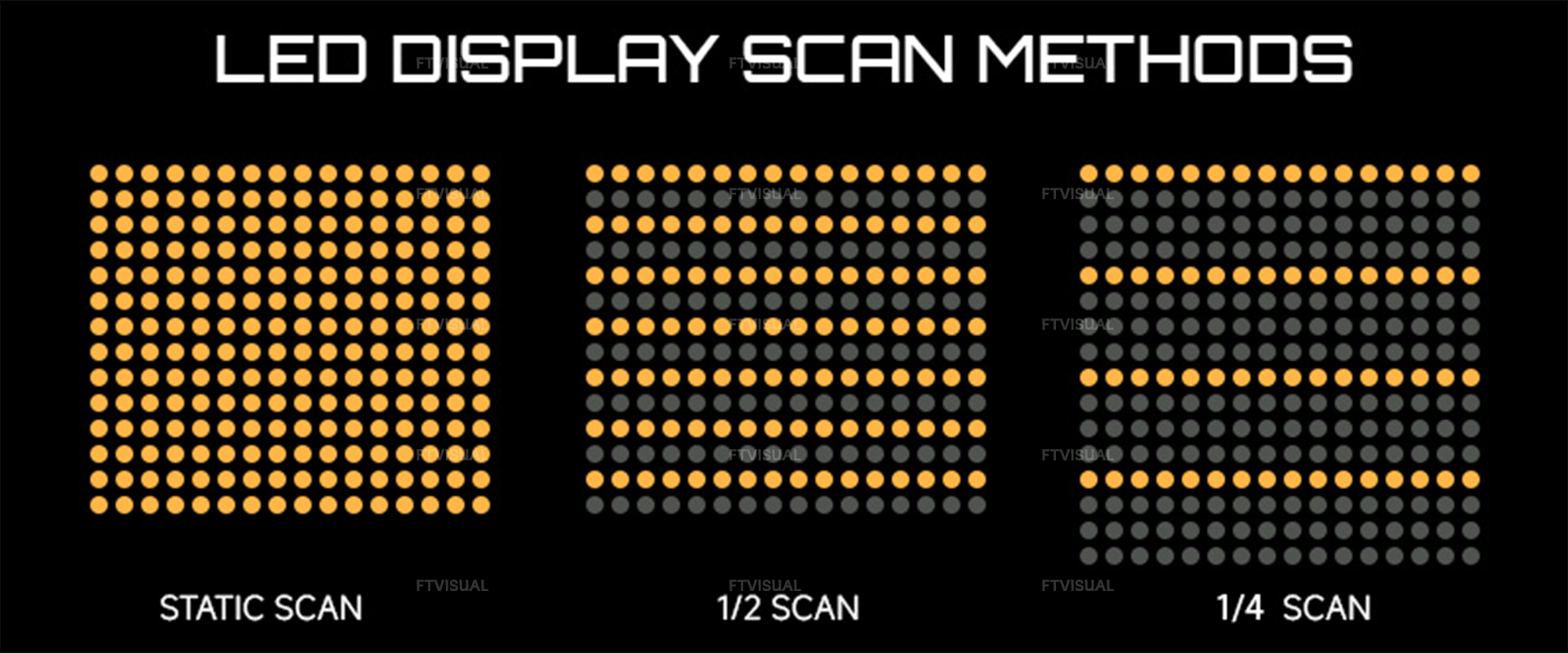
An LED screen's scan rate (or scan mode) is the ratio of rows lit simultaneously to the total number of rows on the screen. It represents how many LEDs are powered at a time by a single driver chip, using time-division multiplexing to create a full, seamless image.
1.How Scan Rates Work
Scan rates are usually written as fractions like 1/4, 1/8, 1/16, or 1/32. The number represents the ratio of rows lit at exactly the same time to the total number of rows on the module.• Static Scan (1/1): Every LED on the panel receives power at the exact same time. It offers the highest brightness and maximum performance but requires the most hardware.
• Dynamic Scan (e.g., 1/16): The system divides the screen into 16 zones and rapidly cycles through them, illuminating 1 row out of every 16 at a time.
2.Why Scan Rate Matters
• Hardware Cost & Efficiency: Lit row cycling reduces the number of driver IC chips needed, lowering manufacturing costs, reducing heat buildup, and saving energy.• Brightness vs. Flickering: With fewer rows powered simultaneously, individual LEDs receive a higher current burst. Lower scan rates generally allow for higher brightness but can cause visible flickering on cameras.
3. Static Scanning (1/1 Scan)
Static Scan (1/1): Every pixel is continuously powered. It offers maximum brightness, zero flickering, and the best image quality. Best for large outdoor billboards.• How it works: Point-to-point control from the driver IC to the LEDs without time-multiplexing.
• Pros: Highest possible brightness, maximum stability, extremely precise grayscale, and no risk of flickering.
• Cons: More hardware (requires more driver ICs), higher power consumption, and increased manufacturing costs.
• Best for: Outdoor, long-range, or mission-critical LED screens.
4. Dynamic Scanning
Pixels are divided into groups (e.g., 1/8, 1/16, or 1/32) and activated cyclically. Higher scanning (like 1/32 or 1/64) are more cost-effective and energy-efficient, but they require higher refresh rates to prevent ghosting on fast-moving content.• Common Types:Every pixel is continuously powered. It offers maximum brightness, zero flickering, and the best image quality. Best for large outdoor billboards.
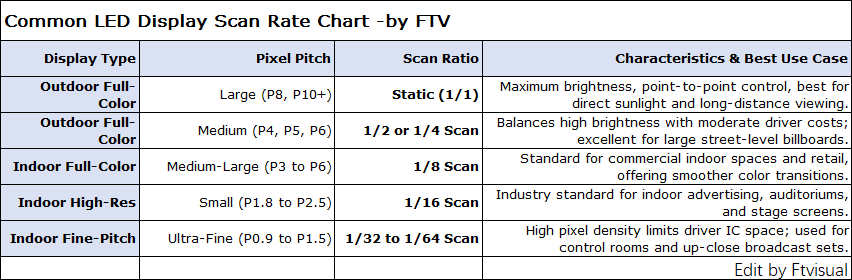
1/4 Scan: Activates one-fourth of the panel's rows at a time. Offers higher current density and strong brightness.
1/8 & 1/16 Scan: Activates rows more quickly in smaller fractions. These are standard for indoor screens as they optimize power efficiency and enable smooth color transitions.
1/32 & 1/64 Scan: Divides the frame into dozens of smaller zones. These are common for modern commercial indoor displays to achieve higher refresh rates and longer lifespans.
• Pros: Lower cost, simpler PCB architecture, and much higher energy efficiency.
• Cons: Theoretically lower overall brightness (though largely offset by modern high-refresh components) and higher demands on system performance.
• Best for: Indoor commercial displays, stage screens, and tight pixel pitches.
5. The Scan Rate vs. Refresh Rate Trade-off
The scan rate dictates how the panel is driven, which directly affects two major performance metrics: Brightness and Refresh Rate.• Refresh Rate (Hz): Measures how many times per second the entire screen updates with a new image. High refresh rates (e.g., 3840Hz to 7680Hz) are required to avoid flickering and dark scan lines when filming the screen with a camera.
• Scan Rate (or scan method/ratio) Measures how a screen physically draws those images line-by-line using multiplexing—for example, lighting up only 1 row out of 4 in a cycle.
• Brightness: In a static scan (1/1), each LED is on 100% of the time, making the screen bright and energy-heavy. In a 1/16 scan, each LED is technically "off" for 15/16ths of a cycle, meaning it loses some natural brightness, though manufacturers can compensate by boosting the electrical current.
• The Connection: The scan rate directly limits the refresh rate. A higher scan ratio (more rows sharing one driver) means the display has to cycle through more lines, which lowers the maximum refresh rate the screen can achieve without flickering.
• Visual Impact: Lower scan rates (like 1/1 static scan) and higher refresh rates result in smoother motion, sharper details, and zero visible flickering under broadcast cameras.
6.How to choose the right scan mode for your needs:
Choosing the right scan mode depends heavily on your hardware needs and final application, here is FTV general advices:• Brightness: If the screen needs to fight intense sunlight, select Static or 1/2 scan.
• Energy Efficiency: If power consumption and low heat are priorities (such as inside a boardroom), choose 1/16 or 1/32 scan.
• On-Camera Use: If the LED wall is being used for broadcasting, film sets, or photography, you need a high refresh rate (minimum 3840Hz) combined with an optimized scan rate to avoid dark scanning lines on camera.
FTV LED Screen Solutions
FTV offer turn-key LED screen solutions to save client cost and time, you can browse below:Indoor LED Wall: Super fine pitch, great visual, work for DCI-P3 Wide Color Gamut
Outdoor LED Screen: High brightness, great visual, and super robust design.
Rental LED Screen: Easy and fast to set-up, robust& reliable design.
Creative LED Screen: Customized LED Walls with various shapes.
For more solutions and customization, please be free to contact us.