
3 Jun, 2026
All about Refresh rate of LED Display
The refresh rate of an LED display measures how many times per second the screen updates the image, measured in Hertz (Hz). It dictates motion fluidity, visual stability, and camera performance. Higher refresh rates prevent visible scan lines, reduce flickering, and prevent eyestrain.
Understanding the refresh rate is critical for optimizing your viewing experience, especially if the screen is being photographed or filmed.
1. Common Refresh Rates
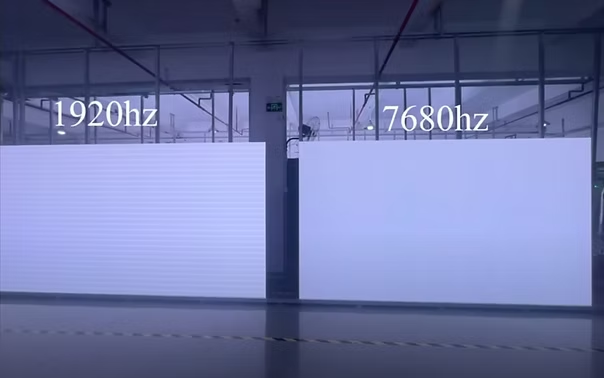
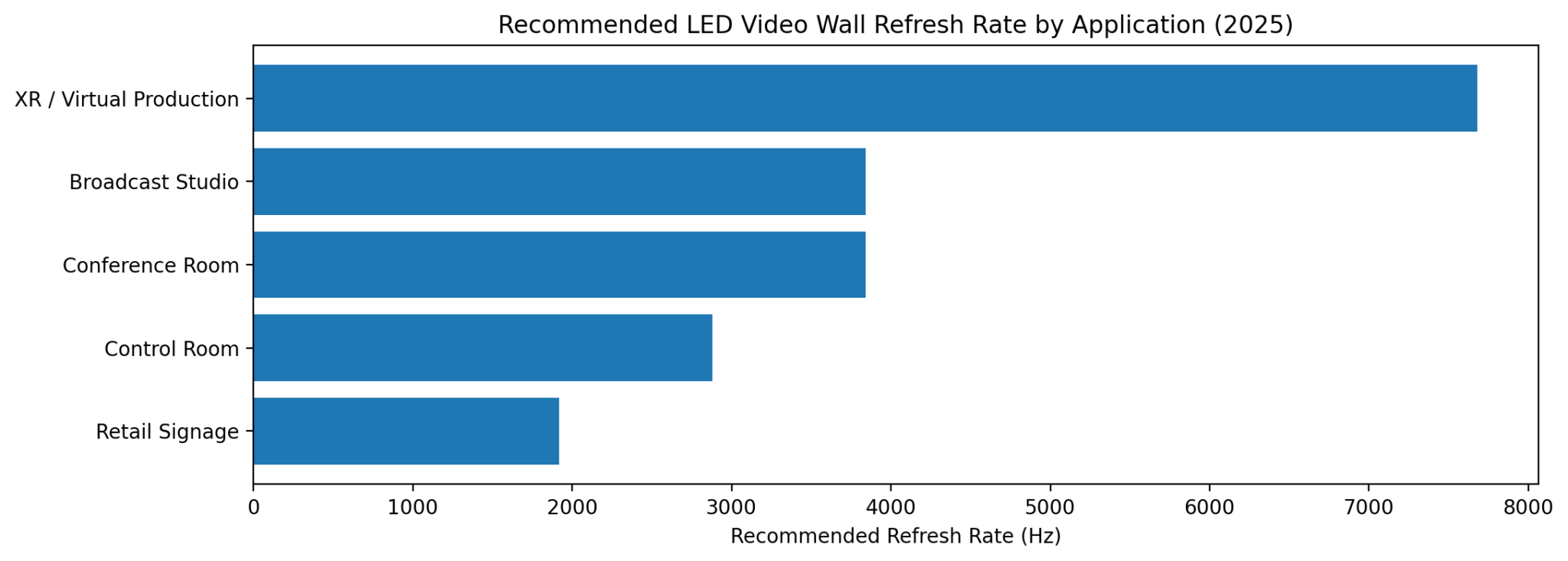
Modern LED screens generally operate at the following refresh rates, largely dictated by their internal driver ICs and scanning methods:• 1920Hz: A standard rate often used for basic digital signage, static advertising, and standard event screens.
• 3840Hz: The recommended baseline for professional applications, broadcast studios, and events. It is high enough to avoid scanning lines or flickering when captured on cameras or smartphones.
• 7680Hz: Used in high-end environments like virtual production studios, film sets, and close-up corporate presentations to ensure absolute visual stability.
2. Why Refresh Rate Matters
• No Camera Flicker: If you point a smartphone at a 60Hz screen, you will often see distracting black lines or a rolling shutter effect. High refresh rate screens (like 3840Hz and above) eliminate this.• Smooth Motion: Fast-moving content, such as live sports or high-speed animation, appears much smoother and retains higher clarity.
• Reduced Eye Strain: Lower refresh rates can cause subtle, almost imperceptible flickering that leads to eye strain and fatigue during prolonged viewing.
3. Key Factors That Influence Refresh Rate
• Driver ICs: The quality of the LED driver integrated circuits (ICs) on the panel dictates how fast the pixels can update. Upgrading to advanced PWM (Pulse Width Modulation) driver ICs is the primary way manufacturers achieve high refresh rates.• Scan Rate (Multiplexing): How the screen drives its pixels row by row affects the refresh rate. A lower scan ratio (e.g., 1/8 vs. 1/32) generally yields better brightness and stability, but comes with a trade-off in overall panel size.
• Grayscale Performance: A higher refresh rate, combined with high-quality driver chips, also improves the screen’s ability to display deep gradients and rich colors without "blocky" artifacts.
4.Refresh Rate vs. Frame Rate
It is easy to confuse these two metrics, but they serve different purposes:• Refresh Rate (Hz): The number of times your display redraws the image per second.
• Frame Rate (FPS): The number of frames (images) generated per second by the content source (e.g., a video file, a computer rendering a video game).
Tip: While a high refresh rate makes motion look fluid, it cannot artificially increase the frame rate of a video source that is capped at 30fps or 60fps.
5. How to Choose
While higher numbers sound better, the highest refresh rate is not always necessary.If your screen is mainly displaying static posters or is viewed from a great distance outdoors, a standard 1920Hz rate is usually sufficient and more budget-friendly.
However, if the LED wall is indoors, frequently broadcasted on TV, or used in photography-heavy environments, you should source or request a display capable of at least 3840Hz.
FTV LED Screen Solutions
FTV offer turn-key LED screen solutions to save client cost and time, you can browse below:Indoor LED Wall: Super fine pitch, great visual, work for DCI-P3 Wide Color Gamut
Outdoor LED Screen: High brightness, great visual, and super robust design.
Rental LED Screen: Easy and fast to set-up, robust& reliable design.
Creative LED Screen: Customized LED Walls with various shapes.
For more solutions and customization, please be free to contact us.